Gallipoli Settings Optimizer
Make Expedition gunfights readable before you blame your class.
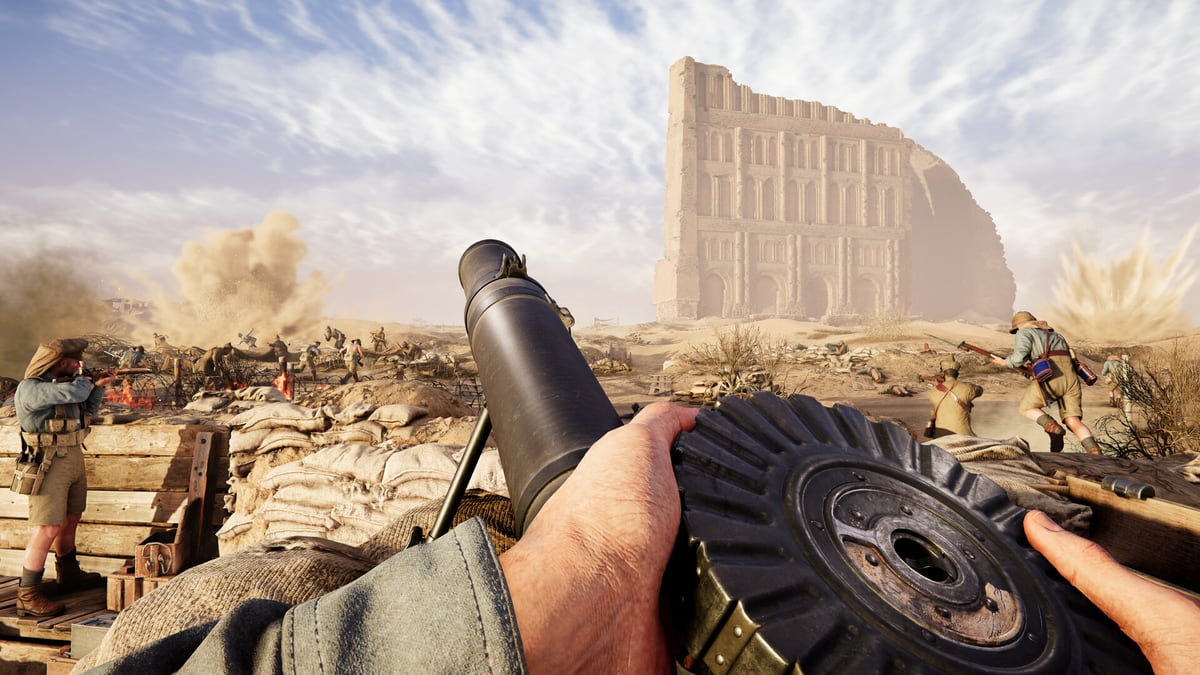
This Settings Optimizer is practical graphics, audio, and network advice for Gallipoli and the broader WW1 Game Series style of shooter from BlackMill Games. Exact menus may use slightly different labels on PC and consoles at launch (August 20, 2026), so treat each tip as a goal — clarity, stable pacing, informative sound — rather than a single magic preset file.
Gallipoli’s 25v25 Expedition fights punish bad information. If you cannot see a helmet on Anzac scrub, cannot hear a Bomber on a Cape Helles stair, or rubberband during a Kut room clear, no Best Loadouts package will save you.
Return to the Tools Hub for the Class Picker after your configuration feels trustworthy.
Optimization goals
- Silhouette readability over cinematic fog soups
- Stable frame pacing over occasional ultra screenshots
- Footsteps and gun direction that survive artillery beds
- Input that feels honest in one-shot-one-kill gunplay
- Network habits that keep Headquarters fights fair enough to read
Graphics: clarity first
WW1 maps mix dust, smoke, glare, and busy trenches. Your settings should answer: “Can I spot a player-shaped break in the terrain quickly?”
Recommended priorities:
- Cap or manage frame rate for consistency during 50-player chaos.
- Prefer sharper mid-range detail over maximum foliage fairy lights.
- Reduce motion blur and heavy film grain if those options exist — they hide Sniper shuffles and Stretcher Bearer crawls.
- Keep effects visible enough to respect suppression and explosions, but not so loud that Headquarters geometry disappears.
- On beach maps like Anzac, watch for brightness crushed into white sand; nudge exposure or brightness until trench lips remain distinct.
If your machine must choose, sacrifice decorative shadows before you sacrifice resolution clarity at the ranges Officers and HMGs actually fight.
Audio: the hidden ranked advantage
In series-style combat, sound often beats minimap addiction.
Tune for:
- Footsteps and nearby reload tells
- Directional gunfire so you know which ridge is hot
- Downed or squad callouts if the mix allows
- Explosion volume that warns without permanently muting voices
Use headphones when possible. Stretcher Bearers especially should be able to hear whether a body is still under active fire before committing — see Stretcher Bearer. Bombers need to hear the suppression window that says “enter now” from Firepower Roles.
If your mixer offers music versus effects sliders, keep music modest during learning weeks. Expedition Momentum mistakes are loud enough already.
Controls and aim feel
One-shot-one-kill games reward predictable turn rates more than trendy accel curves.
- Pick a sensitivity that lets you check a Kut doorway without spinning past it.
- Prefer raw or low-accel styles if available on PC.
- Map a comfortable key or button for the actions you spam as Officer or Bearer — communication and interact beats a fourth grenade bind you never touch.
- On controller, test both aim assist defaults carefully; historical shooters sometimes feel better with gentler assist once you learn recoil postures.
Revisit sensitivity after you main a class. HMG players who mostly hold lanes may enjoy slightly lower turn rates than LMG walkers.
Network and session hygiene
Crossplay 25v25 means full lobbies and long attacks. Help your connection:
- Prefer wired Ethernet when you can.
- Close heavy downloads before a Cape Helles landing attempt.
- Avoid VPNs unless you know they improve your route.
- If you host party voice elsewhere, keep system voice and game voice from fighting for the same hot mic.
Packet spikes during a Headquarters secure feel like “bad guns.” Often they are bad timing plus bad network conditions.
Role-specific settings notes
- Officer — prioritize clarity and voice; you need to see the objective and speak. Guide: Officer Guide.
- Sniper / HMG — stable frames and sharp mid-long silhouettes matter more than pretty ambient shade.
- Stretcher Bearer — audio first; graphics second; never blind yourself with cinematic darkness in trenches.
- Bomber / LMG — slightly snappier look rates help room peeks, but not at the cost of recoil tracking.
Still unsure which role you are optimizing for? Run the Class Picker, then return here.
A 15-minute tuning routine
- Set a frame cap you can hold in a busy fight fantasy (or in series benchmarks if you own prior titles).
- Disable blur/grain extras.
- Raise effect readability until explosions still inform without whiteout.
- Put on headphones; lower music; raise footsteps/effects balance.
- Spend five minutes in a quiet turn-rate drill: corner, ridge, 180 check.
- Play one mental scenario per map from the Maps Overview: beach cross, fort approach, street clear.
- Only then judge your kit using Best Loadouts or the Weapon Tier List.
How settings interact with Expedition
When Momentum is low, panic settings feel worse. Readable games help you make the Officer decision to take a Support Objective instead of feeding the same trench. Mode literacy still comes from Expedition Mode; settings only make the information available in time.
After launch checklist
Once Gallipoli ships, capture your final PC or console screenshots of menus and note driver versions. Re-test after major patches — WW1 series updates sometimes change lighting or audio mixes enough to deserve a recalibration. Keep this page as the goals list; fill in exact recommended numbers when the community converges.
Clear eyes, honest sound, stable frames. Everything else in the Classes Overview gets easier when the game stops lying to your senses.
Frequently Asked Questions
Quick answers to the most common questions.
Will you publish exact slider numbers?
After launch, when menus and community testing stabilize. Pre-launch advice focuses on goals that transfer across PC and consoles.
Is ultra graphics bad?
Only when it hides players or tanks frame pacing. If you can hold clarity and stability on higher presets, keep the eye candy.
What should Stretcher Bearers prioritize?
Headphones, footsteps, and trench readability so you do not walk into active sniper lanes during a revive.
Does this replace class guides?
No. Settings make information available; class guides and the Class Picker tell you what to do with that information.
Where should I go next?
Use the Class Picker if you lack a main, or jump into Getting Started and Expedition Mode if you still need battlefield fundamentals.